The official layout format, in short
OpenMOSS documents layout prompts as experimental. The format has four parts:
summary.caption— one description of the overall scene and style. Optionalmetatags such as poster, andcanvas: single, multi_panel, or collage.items— a flat list. Each item has a label (object, character, or text), a caption, and a bbox. Text items add the exact characters, using a line break for a new line.bbox_formatis yxyx: each box is [y_min, x_min, y_max, x_max].bbox_coord_spaceis abs_centralized: pixel coordinates measured from the centre of the canvas.
The canvas size is not inside the JSON. Generate at the same width and height you drew. The builder sends both, pretty-printed, with the full preset name.
How the conversion works
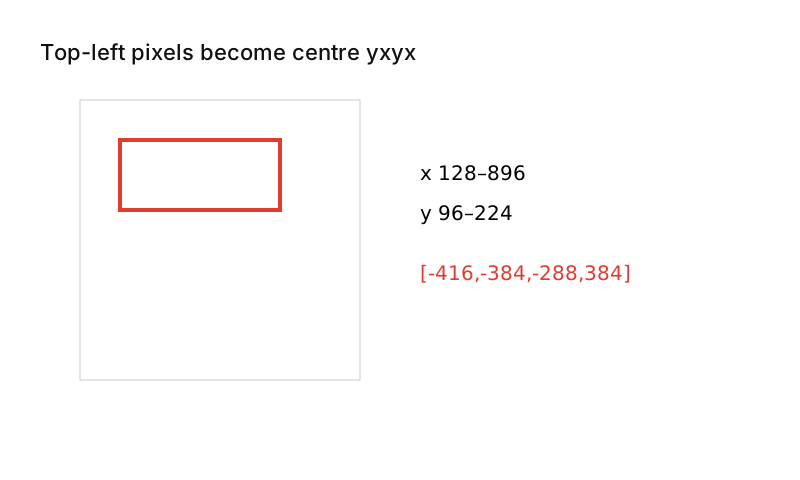
You draw in ordinary top-left pixels. For each box the builder rounds outward to whole pixels, subtracts half the width from x and half the height from y, and writes y-x-y-x order. That matches compile_prompt.py in OpenMOSS's Prompt Enhancer skill. A box at x 128–896, y 96–224 on a 1024² canvas becomes [-416, -384, -288, 384], the title box of the official EXPLORE example.
The builder refuses sizes that are not multiples of 16, boxes outside the canvas or with zero area, text elements without text, and an empty summary.
Tips
- Size boxes for the text. A short title needs a different box from a paragraph.
- Use the summary for global style and item captions for local appearance.
- Boxes are placement guides. They are not drawn unless the caption asks for a frame.
- Overlap is allowed.
Two presets are OpenMOSS examples (EXPLORE poster; ceramic cup). The café menu and festival poster presets were written here. We have not published our own generated results for these presets. Sample images elsewhere on the site are OpenMOSS published outputs, labeled as such.
Sources
- MOSS-Image user guide (USERGUIDE.md)
- Prompt Enhancer skill – layout reference
- OpenMOSS/MOSS-Image on GitHub (README)
- OpenMOSS – MOSS-Image project page
Facts checked 2026-10-18.